Third-party dependence
Your printed codes point at a vendor’s domain. Their outage or policy change becomes yours.
Create, organize, track, and manage dynamic QR codes on your own infrastructure. Keep control of your destinations, campaigns, and data.
BestQR Manager is not released yet. Nothing here can be installed or purchased today.
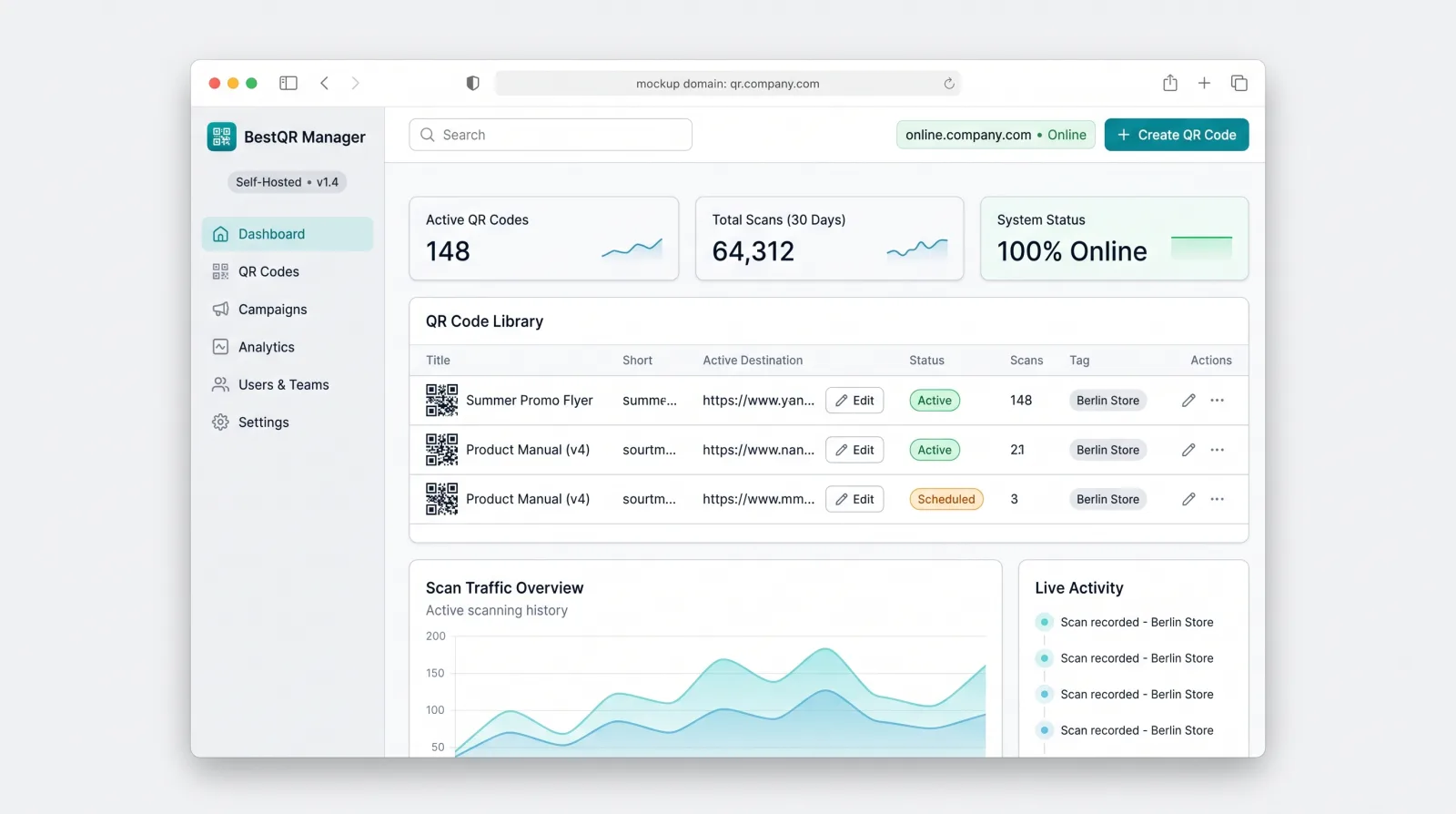
Dynamic QR codes usually live on someone else’s platform. That is convenient until it isn’t.
Your printed codes point at a vendor’s domain. Their outage or policy change becomes yours.
Caps on codes, scans or users push you into higher tiers as your usage grows.
Codes already printed on packaging and signage make leaving expensive.
If a platform shuts down or you stop paying, codes can stop resolving.
This is the intended scope. It is not final and may change with early-access feedback.
Create fixed codes, or dynamic ones that point at a redirect you control.
Change where a dynamic code leads without reprinting it.
Group codes by campaign, owner and period.
Organise large libraries by brand, location or product line.
Serve redirects from your own branded domain.
Counts and trends stored in your own database.
Create many codes at once from a list or CSV.
Colors, logos and shapes, consistent with the free generator.
Shared access with roles for marketers and administrators.
Take your codes and scan data with you at any time.
With BestQR Manager, scans resolve through a service you operate, on a domain you own.
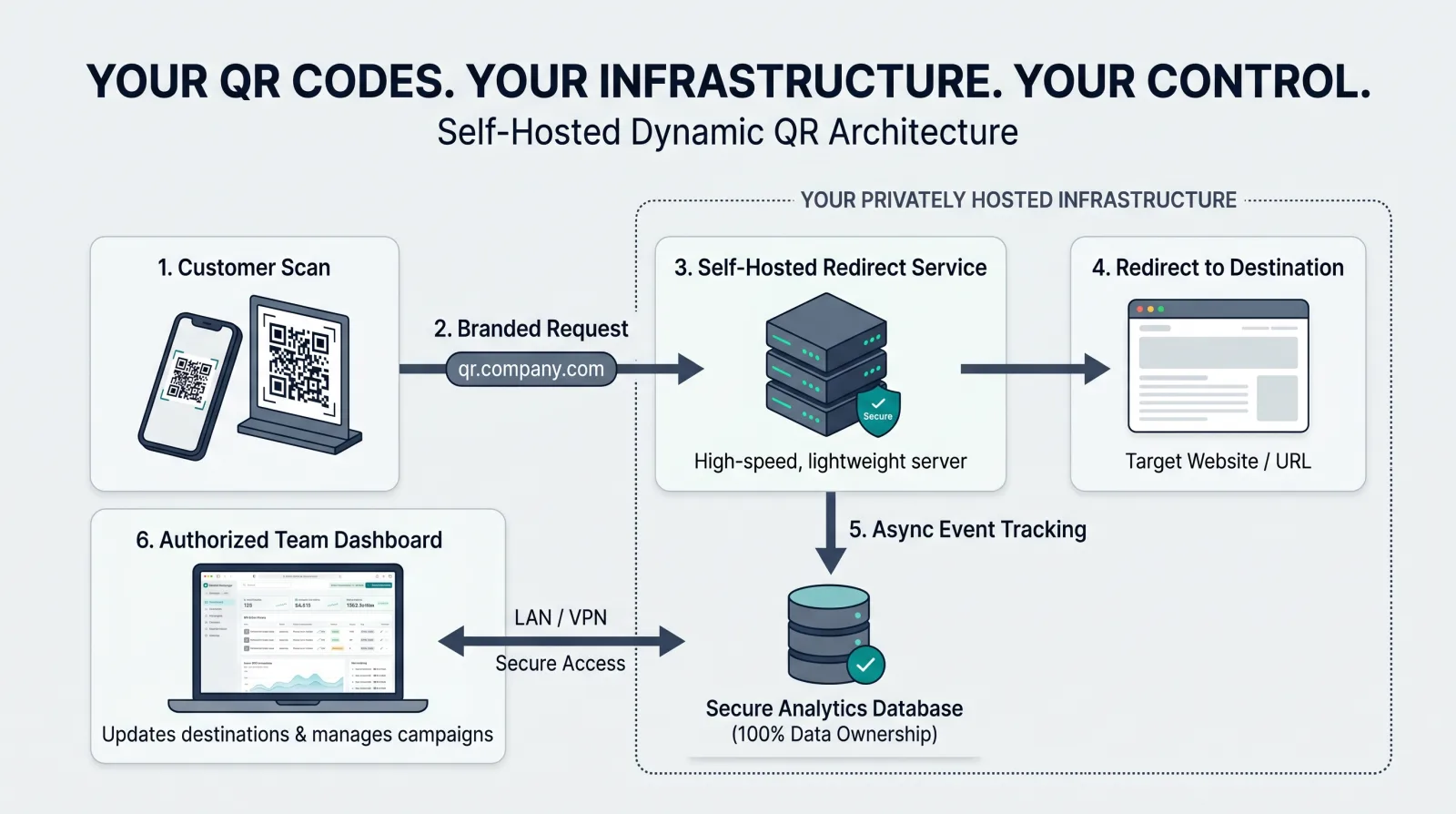
Worth knowing: a dynamic code works only while your redirect server and domain are running. Self-hosting gives you control, and it also makes uptime, backups and domain renewal your responsibility.
Shelf, window and checkout codes across many stores, organised by location.
Codes on packs that need to stay editable long after they are printed.
Badges, signage and schedules that change right up to the day.
Menus and table codes updated centrally across venues.
Campaign codes with owners, folders and exportable results.
Hundreds or thousands of codes under one governed library.
Deploy the application on a server you manage.
Point a branded domain at your redirect service.
Build codes, organise them and edit destinations.
Review scan counts and trends in your own data.
Join the list to hear about progress and help shape what gets built first. Registering doesn’t buy or reserve anything and isn’t a commitment on either side.
No. It is in development and has not been released. The early-access list is how we will contact you about progress. There is no release date to share.
A static QR code contains its destination directly, so it can’t be changed after printing. A dynamic QR code points to a short redirect URL on a server, so the destination can be edited later and scans can be counted. The free BestQR generator makes static codes; BestQR Manager is planned for dynamic ones.
Requirements aren’t finalised. Dynamic codes need a redirect service reachable on a domain you control, so you’ll need a server, a domain and TLS. Tell us your environment in the form so it can shape the plan.
Dynamic QR codes depend on the redirect server and domain that you run. If they are unavailable, scans of those codes will not resolve. Running it yourself means that reliability, backups and domain renewals are your responsibility. For codes that must never depend on a server, use static codes.
Pricing and licensing have not been decided or announced, and nothing can be purchased yet.
The application is designed to run on your infrastructure, so your QR codes, destinations and scan data are stored where you choose to run it, not on BestQR servers.
No. The free generator and all existing tools stay free and available as they are.